---
title: SMS Personalisation Fields
description: Notifyre lets you easily add custom personalisation tokens (also called mail merge fields) to your SMS sends, so each recipient gets a message tailored just for them.
---
[Skip to content](https://support.notifyre.com/sms-personalisation-fields#main-content)
[](https://notifyre.com/)
- [Login](https://app.notifyre.com/login)
- [Pricing](https://notifyre.com/)
- [Contact](https://notifyre.com/)
- [Sender ID Registration](https://support.notifyre.com/alphanumeric-sender-id-registration)
Open main navigation
Close main navigation
- [Login](https://app.notifyre.com/login)
- [Pricing](https://notifyre.com/)
- [Contact](https://notifyre.com/)
- [Sender ID Registration](https://support.notifyre.com/alphanumeric-sender-id-registration)
- [Sign Up](https://notifyre.com/signup/)
[Sign Up](https://notifyre.com/signup/)
Notifyre Guides, FAQs & Customer Support
- There are no suggestions because the search field is empty.
1. [Help Center](https://support.notifyre.com/?hsLang=en)
2. [SMS & MMS](https://support.notifyre.com/sms-mms?hsLang=en)
3. [Sending SMS & MMS](https://support.notifyre.com/sms-mms?hsLang=en#sending-sms-mms)
November 6, 2025
# SMS Personalisation Fields
## Notifyre lets you easily add custom personalisation tokens (also called mail merge fields) to your SMS sends, so each recipient gets a message tailored just for them.
Personalising your SMS messages makes your communications more engaging and relevant. Notifyre lets you easily add custom personalisation tokens (also called mail merge fields) to your SMS sends, so each recipient gets a message tailored just for them.
Personalisation fields are available when sending SMS via your Notifyre online account, [SMS API](https://support.notifyre.com/notifyre-developer-api-documentation?hsLang=en), and [Email to SMS](https://support.notifyre.com/sms/email-to-sms?hsLang=en) services. In this guide you will learn how to:
- [Understand what SMS personalisation fields are](https://support.notifyre.com/sms-personalisation-fields#what-are-they)
- [View the available personalisation fields in Notifyre](https://support.notifyre.com/sms-personalisation-fields#available-fields)
- [Populate personalisation fields for your contacts](https://support.notifyre.com/sms-personalisation-fields#how-to-populate)
- [Insert personalisation tokens into your SMS messages](https://support.notifyre.com/sms-personalisation-fields#how-to-use)
### What are SMS personalisation fields?
SMS personalisation fields are placeholders in your message that automatically insert unique information for each contact when the SMS is sent. This can include details like appointment times, discount codes, or order numbers.
### Available personalisation fields in Notifyre
Notifyre offers a variety of built-in and custom personalisation fields to tailor your messages, including:
- First name
- Last name
- Mobile number
- Fax number
- Organisation
- Email address
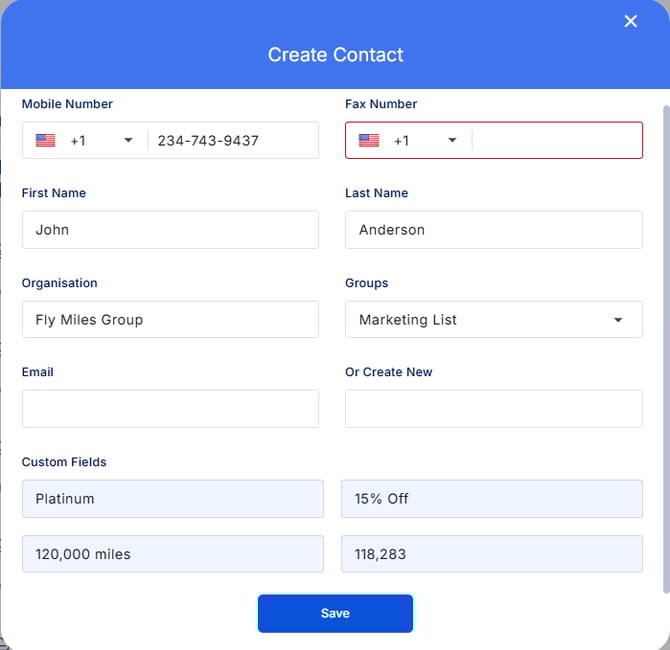
- Four custom fields (cf1, cf2, cf3, cf4)
You can use the four custom fields to insert any additional information relevant to your business, such as:
- Appointment times
- Discount codes
- Order numbers
- Pickup locations
- Account details
- Unique URLs
#### Custom Field examples for a frequent flyer member
#### How to populate personalisation fields
You can add or update these personalisation fields when:
- [Adding contacts manually](https://support.notifyre.com/contacts/how-to-create-a-contact?hsLang=en)
- [Importing contacts in bulk via CSV upload](https://support.notifyre.com/contacts/how-to-import-contacts?hsLang=en)
Simply fill out the relevant information for each contact in the corresponding fields.
💡If you use a personalisation field that hasn’t been filled out for a contact, the corresponding space in the received SMS will be left blank.
### How to insert personalisation tokens in your SMS
1. While creating your SMS message, click the **Personalise** button.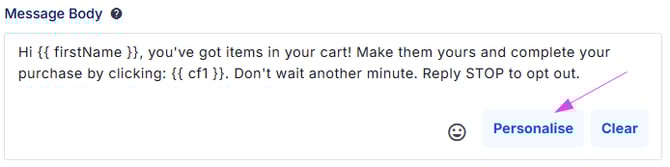
2. Choose the personalisation token you want to use, such as:
- First name
- Last name
- Mobile number
- Fax number
- Organisation
- Email address
- Custom fields (cf1, cf2, cf3, cf4)
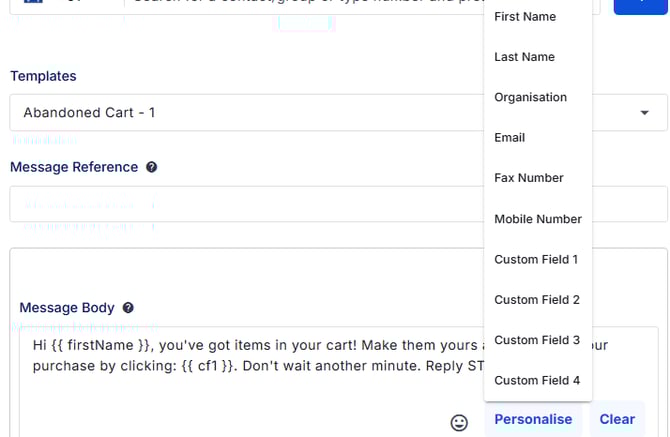
When your SMS is sent, Notifyre will automatically replace these tokens with the saved data for each contact.
💡Keep in mind that using personalisation tags can affect the total character count of your message. For example, **"First Name"** might be replaced with “Sarah” or “Christopher,” depending on the contact. Longer merged data can increase the number of SMS parts and impact the final cost of your send.
[Learn more about SMS character limits](https://support.notifyre.com/sms/sms-character-limits?hsLang=en)
### 👁️🗨️SMS Preview Limitation
The message preview in Notifyre does not currently show the merged personalisation data before sending. If you'd like to see this feature in the future please [contact our team](https://notifyre.com/).
You can view the final personalised message and total cost per recipient after sending on the [SMS Activity](https://support.notifyre.com/sms/sms-activity?hsLang=en) page.
- [Getting Started](https://support.notifyre.com/getting-started?hsLang=en)
- [Fax](https://support.notifyre.com/fax?hsLang=en#main-content)
- [Sending Fax](https://support.notifyre.com/fax?hsLang=en#sending-fax)
- [Receiving Fax](https://support.notifyre.com/fax?hsLang=en#receiving-fax)
- [Fax Numbers & Porting](https://support.notifyre.com/fax?hsLang=en#fax-numbers-porting)
- [General](https://support.notifyre.com/fax?hsLang=en#general)
- [Compliance](https://support.notifyre.com/fax?hsLang=en#compliance)
- [SMS & MMS](https://support.notifyre.com/sms-mms?hsLang=en#main-content)
- [General](https://support.notifyre.com/sms-mms?hsLang=en#general)
- [Sending SMS & MMS](https://support.notifyre.com/sms-mms?hsLang=en#sending-sms-mms)
- [Receiving SMS & MMS](https://support.notifyre.com/sms-mms?hsLang=en#receiving-sms-mms)
- [10DLC Registration](https://support.notifyre.com/sms-mms?hsLang=en#10dlc-registration)
- [SMS Sender ID Register (AU)](https://support.notifyre.com/sms-mms?hsLang=en#sms-sender-id-register-au)
- [Compliance](https://support.notifyre.com/sms-mms?hsLang=en#compliance)
- [SMS Templates](https://support.notifyre.com/sms-mms?hsLang=en#sms-templates)
- [Contacts](https://support.notifyre.com/contacts?hsLang=en)
- [Account & Security](https://support.notifyre.com/account-security?hsLang=en#main-content)
- [Security](https://support.notifyre.com/account-security?hsLang=en#security)
- [Team Management](https://support.notifyre.com/account-security?hsLang=en#team-management)
- [Billing & Plans](https://support.notifyre.com/billing-plans?hsLang=en)
- [Integrations & Apps](https://support.notifyre.com/integrations-apps?hsLang=en#main-content)
- [Notifyre App](https://support.notifyre.com/integrations-apps?hsLang=en#notifyre-app)
- [Developers](https://support.notifyre.com/developers?hsLang=en#main-content)
- [Webhooks](https://support.notifyre.com/developers?hsLang=en#webhooks)
- [Frequently Asked Questions (FAQs)](https://support.notifyre.com/frequently-asked-questions-faqs?hsLang=en#main-content)
- [Account Management FAQ](https://support.notifyre.com/frequently-asked-questions-faqs?hsLang=en#account-management-faq)
- [Billing FAQ](https://support.notifyre.com/frequently-asked-questions-faqs?hsLang=en#billing-faq)
- [Fax Send & Receive FAQ](https://support.notifyre.com/frequently-asked-questions-faqs?hsLang=en#fax-send-receive-faq)
- [SMS & MMS Send & Receive FAQ](https://support.notifyre.com/frequently-asked-questions-faqs?hsLang=en#sms-mms-send-receive-faq)
[](http://notifyre.com)
| United States | Australia | [Login ](https://app.notifyre.com/) |
| --- | --- | --- |
| [Contact Support ](https://notifyre.com/us/contact-support) | [Contact Support ](https://notifyre.com/au/contact-support) | [System Status ](https://status.notifyre.com/) |
| Monday to Friday, 9:00am to 5:30pm (Mountain Time) | Monday to Friday, 8:00am to 5:30pm (AEST) | [Go to notifyre.com](https://notifyre.com/) |
| [+1 866 620 3220](tel:+18666203220) | [1300 032 936](tel:1300032936) or Intl: [+61 7 5227 8333](tel:+61752278333) | |
| [Privacy](https://notifyre.com/us/legal/privacy-policy) · [Terms](https://notifyre.com/us/legal/terms-and-conditions) | [Privacy](https://notifyre.com/au/legal/privacy-policy) · [Terms](https://notifyre.com/au/legal/terms-and-conditions) | |