
If you need to transfer ownership of your Notifyre account, follow the steps below:
- Login to the Notifyre Dashboard
- Select Settings
- Select Account
- Select the Team tab
- Click Invite User
- Enter the user's email address in the Email field
- Select the Role dropdown and assign the Admin Role
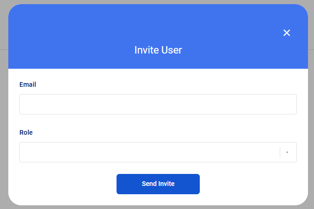
- Click Send Invite.
- The invited team member will receive an email inviting them to join your Notifyre account.
Note: Invited users will have 24 hours to accept their invite via email. After 24 hours the link will expire and the invite will need to be resent. See how to resend an invite - The team member will need to click on the Login button and create their profile.
Once the new user is added and has admin access, contact our support team to finalise the ownership change. We’ll verify the request and complete the transfer securely.
Contact Us
Australia:
-
Live chat: Available on our website
-
Phone: 1300 032 936
United States:
-
Live chat: Available on our website
-
Phone: (866) 620-3220