
 Region Applicable: Australia
Notifyre provides the option to use a non-Notifyre-hosted SMS number as your custom SMS Sender ID.
This Custom Sender ID appears as the 'From' number when you send SMS using Notifyre.
To use a non-Notifyre hosted SMS number as a Custom SMS Sender ID, Notifyre requires a copy of your latest tax invoice for verification of ownership.
Submit a request to use a non-Notifyre-hosted Numeric Sender ID:
- Log in to the Notifyre dashboard.
- Select Settings on the left navigation.
- Select Custom Sender ID from the dropdown menu.
- Select Register New

- Under the 'Sender ID Type', select Numeric
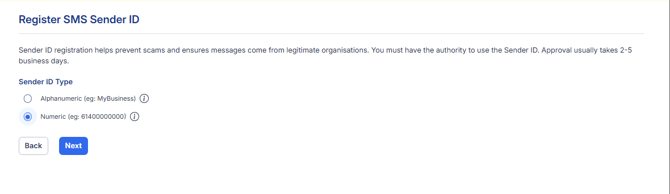
- Select Next
- Enter your desired Sender ID text in the Sender ID field. Enter your mobile number in international format. Maximum of 11 characters. e.g 614XXXXXXXX
- In the Use Case Description field, enter a reference description of the intended use for the Sender ID. Eg: Medical Clinic confirming patient appointments.
- Review and tick to accept the confirmation.
- Click Submit for Approval.
- Your Custom SMS Sender ID request will be sent to Notifyre Support for review. The Notifyre support team will action your request as soon as possible.
💡Custom Numeric Sender IDs may be used when you want to receive SMS replies directly to your mobile device.
SMS replies within Notifyre are not available when using a custom SMS Sender ID. We recommend purchasing a Notifyre hosted Virtual SMS number to use as a dedicated mobile for sending and/or receiving SMS messages.
Landline numbers cannot be used as a Sender ID for SMS as these messages may get rejected by Mobile Carrier Networks.