
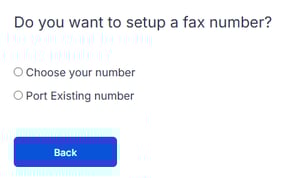
When setting up your plan, you can choose to:
- Order a new fax number, or
- Port your existing fax number (when setting up a receive fax plan)
If you have multiple numbers to port, you can complete the additional ports after your Fax Receive Plan is active.
 Porting an Australian fax number? View this guide
How to port fax number to Notifyre
(when setting up a receive fax plan)
Before you start Notifyre recommend that you contact your current fax provider to ensure that you are providing accurate porting details.
- Login to Notifyre
- Go to Plans and choose a receive fax plan
- Click Port existing number
- Enter your fax number details and click Next
- Fax number to Port
- Business Name
- Contact first & last name
- Billing Telephone Number (BTN) - The BTN is used to request a customer service record (CSR) from the carrier.
- Service Address - This is the physical location of the phone number on record with the current carrier.
- PIN/Password - Optional: Only applicable if you locked your account with a PIN/Password.
- Account Number - For your existing provider
- Check the details on the summary page
- Accept the following statements
- I accept that the releasing carrier has been contacted and confirm that the number can be ported away.
- I accept that should the releasing carrier reject my porting request the port may be delayed.
- I accept that any liason with my current carrier, either to identify the number type or for reasons of rejection or otherwise, must be performed by the Customer due to privacy reasons. Notifyre will not be permitted to liaise with your current carrier on your behalf.
View full Terms and Conditions here
- Proceed to checkout and complete your purchase.
- Finally please forward the latest copy of your fax number invoice to support@notifyre.com.
📧You’ll receive a confirmation email once your fax number porting request has been submitted and will be alerted once the porting process is complete.
✅Once your fax number/s has been successfully ported to Notifyre, any incoming faxes sent to that number will be received via the Notifyre and will be accessible within your Activity reports.
How to port additional fax numbers
- Login to Notifyre
- Go to Settings and select Numbers
- Click Port Number

- Enter your fax number details and click Next
- Fax number to Port
- Business Name
- Contact first & last name
- Billing Telephone Number (BTN) - The BTN is used to request a customer service record (CSR) from the carrier.
- Service Address - This is the physical location of the phone number on record with the current carrier.
- PIN/Password - Optional: Only applicable if you locked your account with a PIN/Password.
- Account Number - For your existing provider
- Check the details on the summary page
- Accept the following statements
- I accept that the releasing carrier has been contacted and confirm that the number can be ported away.
- I accept that should the releasing carrier reject my porting request the port may be delayed.
- I accept that any liason with my current carrier, either to identify the number type or for reasons of rejection or otherwise, must be performed by the Customer due to privacy reasons. Notifyre will not be permitted to liaise with your current carrier on your behalf.
View full Terms and Conditions here
- Proceed to checkout and complete your purchase.
- Finally please forward the latest copy of your fax number invoice to support@notifyre.com.
We’re here to help with fax number porting
Porting your fax numbers doesn’t have to be stressful. Notifyre has extensive experience managing large scale fax migrations and will work closely with your team to ensure a smooth transition with minimal downtime. Contact our team for guide porting support.